Vaidikalaya

Crud Operation In Laravel Using Ajax

In this tutorial, we will learn how to do crud operations in Laravel with Ajax.

So, we will create an employee management app where we can add, update, and delete employees.

This task will help you for your interview scenario because many companies give tasks that add users or employees in Laravel using Ajax.


STEP 1: Create a Laravel app

laravel new laravel-ajax-crud-operation

STEP 2: Go to the project directory

cd laravel-ajax-crud-operation

STEP 3: Create an Employee model and migration

Now create a model and migration for employees where you store your employee data like first name, last name email phone, and password or other fields which you want. use the below artisan command to create a model and migration together.

php artisan make:model Employee -m

STEP4: Fill migration file

now go to the database/migrations/employees migration file and write the schema fields that you want in your employee table. In this migration file, we write some basic fields like first name, last name, email, phone, and password.

<?php
use Illuminate\Database\Migrations\Migration;
use Illuminate\Database\Schema\Blueprint;
use Illuminate\Support\Facades\Schema;

return new class extends Migration
{
    public function up()
    {
        Schema::create('employees', function (Blueprint $table) {
            $table->id();
            $table->string('firstname');
            $table->string('lastname');
            $table->string('email')->unique();
            $table->string('phone');
            $table->timestamp('email_verified_at')->nullable();
            $table->string('password');
            $table->rememberToken();
            $table->timestamps();
        });
    }

    public function down()
    {
        Schema::dropIfExists('employees');
    }
};


STEP 5: Now start your xampp server and run the migration

now run the php artisan migrate command to create database tables. If your database is not created then it will create a database that is present in your env file and then migrate your all migrations in the database. So let's start migrations and see below screenshots of migrations and the database.

php artisan migrate


STEP 6: Create Employee Controller.

Now your database is ready and it is time to create controller and blade files for further steps.

Create EmployeeController and write code for employees' add, edit, update, and delete.

php artisan make:controller EmployeeController

STEP 7: Write code in EmployeeCOntroller

<?php
namespace App\Http\Controllers;
use Illuminate\Http\Request;
use Illuminate\Support\Facades\Hash;
use Illuminate\Support\Facades\Validator;
use App\Models\{Employee};

class EmployeeController extends Controller
{
//this method return welcome view pages with all employees
    public function index(){
        $employees=Employee::all();
        return view('welcome',compact('employees'));
    }

//here first we check it employeed id not present then it will create employees otherwise update.
    public function addUpdateEmployee(Request $request){
        if($request->employeeId){
            return $this->updateEmployee($request);
        }
        else{
            return $this->addEmployee($request);
        }        
    }

//this code first, validate employee data and then add
    public function addEmployee($request){
        $validator = Validator::make($request->all(), [
            'firstname' => ['required', 'string', 'max:255'],
            'lastname' => ['required', 'string', 'max:255'],
            'email' => ['required', 'string', 'email', 'max:255','unique:employees'],
            'phone' => ['required', 'min:10', 'max:10'],
            'password' => ['required', 'string', 'min:4'],
        ]);
 
        if ($validator->fails()) {
            return  response()->json(['errors' => $validator->errors()->all(),'status'=>400],200);
        }

        $res=Employee::create([
            'firstname'=>$request->firstname,
            'lastname'=>$request->lastname,
            'email'=>$request->email,
            'phone'=>$request->phone,
            'password'=>Hash::make($request->password)
        ]);

        if($res){
            return response()->json(['msg'=>'employee added','data'=>$res,'status'=>200]);
        }
    }

    public function updateEmployee($request){
        $validator = Validator::make($request->all(), [
            'firstname' => ['required', 'string', 'max:255'],
            'lastname' => ['required', 'string', 'max:255'],
            'email' => ['required', 'string', 'email', 'max:255'],
            'phone' => ['required','min:10','max:10'],
        ]);
 
        if ($validator->fails()) {
            return  response()->json(['errors' => $validator->errors(),'status'=>400],200);
        }

        $res=Employee::where('id',$request->employeeId)->update([
            'firstname'=>$request->firstname,
            'lastname'=>$request->lastname,
            'email'=>$request->email,
            'phone'=>$request->phone,
        ]);

        if($request->password){
            $res=Employee::where('id',$request->employeeId)->update([
                'password'=>Hash::make($request->password)
            ]);
        }

        if($res){
            return response()->json(['msg'=>'employee updated','data'=>$res,'status'=>200]);
        }
    }

    public function editEmployee(Request $request){
        $data=Employee::find($request->employeeId);
        return response()->json(["data"=>$data,"status"=>200],200);
    }

    public function deleteEmployee(Request $request){
        if(Employee::where('id',$request->employeeId)->delete()){
            return response()->json(["msg"=>"employee deleted","status"=>200],200);
        }
    }
}

STEP 8: White front-end code in the welcome.blade.php file

Go to resources/views/welcome.blade.php file and write the below code for setup front-end

<!DOCTYPE html>
<html lang="en">
<head>
    <meta charset="UTF-8">
    <meta name="viewport" content="width=device-width, initial-scale=1.0">
    <meta http-equiv="X-UA-Compatible" content="ie=edge">
    <meta name="csrf-token" content="{{ csrf_token() }}">
    <title>Laravel Ajax CRUDtitle>

   
    <script src="https://ajax.googleapis.com/ajax/libs/jquery/3.6.1/jquery.min.js">script>

   
    <link rel="stylesheet" href="https://cdnjs.cloudflare.com/ajax/libs/font-awesome/6.2.1/css/all.min.css"/>

   
    <link href="https://cdn.jsdelivr.net/npm/bootstrap@5.2.3/dist/css/bootstrap.min.css" rel="stylesheet">
    <script src="https://cdn.jsdelivr.net/npm/bootstrap@5.2.3/dist/js/bootstrap.bundle.min.js">script>

    <style>
        input[type=text],[type=email],[type=number],[type=password]{
            box-shadow: none !important;
            border-top:0;
            border-left:0;
            border-right:0;
        }
    style>
head>
<body>
   
    <div class="container mt-5">
        <div class="row justify-content-center">
            <div class="col-md-8">
                <div class="card">
                    <div class="card-header">
                        <a class="btn btn-primary mb-2" data-bs-toggle="modal" data-bs-target="#addEmployeeModal">
                            Add Employee
                        a>
                        @if(session("success_msg"))
                            <span class="text-success">{{session("success_msg")}}span>
                        @endif
                        @if(session("error_msg"))
                            <span class="text-danger">{{session("error_msg")}}span>
                        @endif
                    div>
                    <div class="card-body">
                        <div>
                            @if($employees->count()>0)
                            <table class="table table-striped">
                                <thead>
                                    <tr>
                                        <th>First Nameth>
                                        <th>Last Nameth>
                                        <th>Emailth>
                                        <th>Phoneth>
                                        <th>Actionth>
                                    tr>
                                thead>
                                <tbody>
                                    @foreach ($employees as $employee)
                                        <tr id="table_row_{{$employee->id}}">
                                            <td>{{$employee->firstname}}td>
                                            <td>{{$employee->lastname}}td>
                                            <td>{{$employee->email}}td>
                                            <td>{{$employee->phone}}td>
                                            <td>
                                                <a href="#" id="editEmployee" data-id={{$employee->id}} data-bs-toggle="modal" data-bs-target="#addEmployeeModal">
                                                    <i class="fa fa-pen">i>
                                                a>
                                                <a href="#" id="deleteEmployee" data-id={{$employee->id}} class="ms-3">
                                                    <i class="fa fa-trash">i>
                                                a>
                                            td>
                                        tr>
                                    @endforeach
                                tbody>
                            table>
                            @endif
                        div>
                    div>
                div>
            div>
        div>
    div>

    <div class="modal fade" id="addEmployeeModal" tabindex="-1" aria-labelledby="exampleModalLabel" aria-hidden="true">
        <div class="modal-dialog modal-dialog-centered">
            <div class="modal-content">
                <div class="modal-header">
                <h1 class="modal-title fs-5">
                    Register Employee
                    <div class="text-danger print-error-msg fs-6" style="display: none">
                        <ul>ul>
                    div>
                h1>
               
              <button type="button" class="btn-close" data-bs-dismiss="modal" aria-label="Close" onclick="clearData()">button>
            div>
            <div class="modal-body">
                <form onsubmit="addUpdate(event)" id="addUpdateForm" autocomplete="off">
                    <div class="row g-3">
                       
                        <div class="col-md-6">
                            <div class="form-floating">
                                <input type="text" name="firstname" class="form-control" id="firstname" placeholder="firstname@example.com" required>
                                <label for="firstname">First Namelabel>
                            div>
                        div>
   
                        <div class="col-md-6">
                            <div class="form-floating">
                                <input type="text" name="lastname" class="form-control" id="lastname" placeholder="lastname@example.com" required>
                                <label for="lastname">Last Namelabel>
                            div>
                        div>
   
                        <div class="col-md-12">
                            <div class="form-floating mb-2">
                                <input type="email" name="email" class="form-control" id="email" placeholder="email@example.com" required>
                                <label for="email">Emaillabel>
                               
                            div>
                        div>
   
                        <div class="col-md-12">
                            <div class="form-floating mb-2">
                                <input type="number" name="phone" class="form-control" id="phone" placeholder="phone@example.com" required>
                                <label for="phone">Phonelabel>
                            div>
                        div>
   
                        <div class="col-md-6">
                            <div class="form-floating mb-2">
                                <input type="password" name="password" class="form-control" id="password" placeholder="pasword@example.com" required>
                                <label for="password">Passwordlabel>
                            div>
                        div>

                    div>
                    <input type="hidden" name="employeeId" id="employeeId">
                    <button class="btn btn-primary" type="submit">Submitbutton>
                form>
            div>
          div>
        div>
    div>

<script src="{{asset('assets/js/employees.js')}}">script>
body>
html>


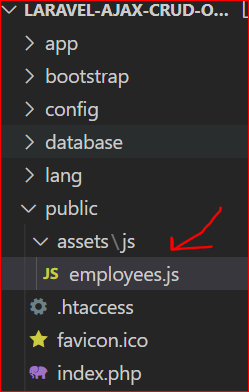
STEP 9: Now Create an employee.js file in the public directory and write Ajax code

Now create one employee.js file in the public directory. we create this file in the public/assets/js/employees.js directory. In this file, you can write your Ajax code. If you want to write Ajax code in the same blade file then you can write it in the same file. but for easy understanding, I suggest you write it in a separate file.
    $(document).ready(function(){
        $.ajaxSetup({
            headers: {
                'X-CSRF-TOKEN': $('meta[name="csrf-token"]').attr('content')
            }
        });
    })

    function addUpdate(event){
        event.preventDefault();
        var formData=$('#addUpdateForm').serialize();
        $.ajax({
            type:'POST',
            url:"/add-update-employee",
            data:formData,
            success:function(res){
                if(res.status===200){
                    $('#addEmployeeModal').modal('hide');
                    location.reload();
                }
                if(res.status===400)
                {
                    printErrorMsg(res.errors);
                }
            },
        });
    }

    $("body #editEmployee").click(function(){
        let employeeId=$(this).attr("data-id");
        $.ajax({
            type:"get",
            url:"edit-employee/"+employeeId,
            success:function(res){
                if(res.status===200){
                    $("#employeeId").val(res.data.id);
                    $("#firstname").val(res.data.firstname);
                    $("#lastname").val(res.data.lastname);
                    $("#email").val(res.data.email);
                    $("#phone").val(res.data.phone);
                    $("#password").removeAttr("required");
                }
                else{
                    alert("data not found");
                }
            }
        });
    });

    $("body #deleteEmployee").click(function(){
        let employeeId=$(this).attr("data-id");
        if(confirm('Are you sure want to delete !')){
            $.ajax({
                type:"DELETE",
                url:"delete-employee/"+employeeId,
                success:function(res){
                    $("#table_row_"+employeeId).remove();
                }
            });
        };
    });

    function printErrorMsg(errors){
        $(".print-error-msg").find("ul").html('');
        $(".print-error-msg").css('display','block');
        $.each( errors, function( key, value ) {
            $(".print-error-msg").find("ul").append('
  • '+value+'
  • '
    );
            });
        }

        function clearData(){
            $("#employeeId").val(null);
            $("#firstname").val(null);
            $("#lastname").val(null);
            $("#email").val(null);
            $("#phone").val(null);
            $("#password").attr("required");
        }

    STEP 10: Set routes in the web.php file

    Now set routes in the web.php file.

    <?php
    use Illuminate\Support\Facades\Route;
    use App\Http\Controllers\{EmployeeController};

    Route::get('/', [EmployeeController::class,'index']);
    Route::post('add-update-employee',[EmployeeController::class,'addUpdateEmployee']);
    Route::get('edit-employee/{employeeId}',[EmployeeController::class,'editEmployee']);
    Route::delete('delete-employee/{employeeId}',[EmployeeController::class,'deleteEmployee']);


    STEP 11: Now run your project and test it.

    php artisan serve


    OUTPUT
