Service Provider
In the previous chapter, we discussed the service container that service container is managing the class dependencies and performing dependency injection. And we saw the example where the service container automatically injects the dependencies by the type-hint method and shows a problem with auto resolving and give the solution for it so that you can register your services in service provides. So here we will discuss the Service Providers in detail.
Laravel's official documentation defines service providers like this:
Service providers are the central place of all Laravel application bootstrapping. Your own application, as well as all of Laravel's core services, are bootstrapped via service providers.
Default Laravel's Service Providers are placed in the app\Providers directory:
These are the default service providers of Laravel.

These all service providers are registered in the providers array of the config\App.php file. These providers bootstrap the core Laravel components, such as the mailer, queue, cache, and others. Many of these providers are "deferred" providers, meaning they will not be loaded on every request, but only when the services they provide are actually needed.

In this chapter, you will learn how to write your own service providers and register them with your Laravel application.
So we start with the example from scratch.
Create Laravel App:
laravel new laravel-service-provider Go to the project directory:
cd laravel-service-provider
Create Service:
Now create a PostServices class in the Services directory which will give services related to posts like posts, post authors, and any other data related to posts.
namespace App\Services;class PostServices{public function posts(){return [['id'=>1,'title'=>'First Post','author'=>'Arjun'],['id'=>2,'title'=>'Second Post','author'=>'Ram']];}public function postAuthors(){return ['Arjun', 'Ram'];}}
Create your provider:
You can create Providers using the artisan command. It will create Providers in the app\Providers directory.
php artisan make:provider CustomServiceProviderRegister your services in Providers:
There are many ways to register services in Service Provide.
Using Bind Method:
The bind method registers the PostServices class into the service container. Whenever this service is resolved from the container, each time a new instance of this class will be provided.
public function register(): void{$this->app()->bind(PostServices::class,function($app){return new PostServices();});}
Using Singleton Method:
The singleton method registers PostServices class into the service container. Here Whenever this service is resolved from the container, each time the same instance of this class will be provided. A new instance is provided only for the first-time resolution of this class, every next resolution will provide the same instance of the class.
public function register(): void{$this->app->singleton(PostServices::class,function($app){return new PostServices();});}
Register your Custom Provide:
Now register your custom provider in providers array of config\app.php file.

Create Controller and Set up routes:
php artisan make:Controller PostController
<?phpuse Illuminate\Support\Facades\Route;use App\Http\Controllers\PostController;Route::get('/', [PostController::class,'index']);
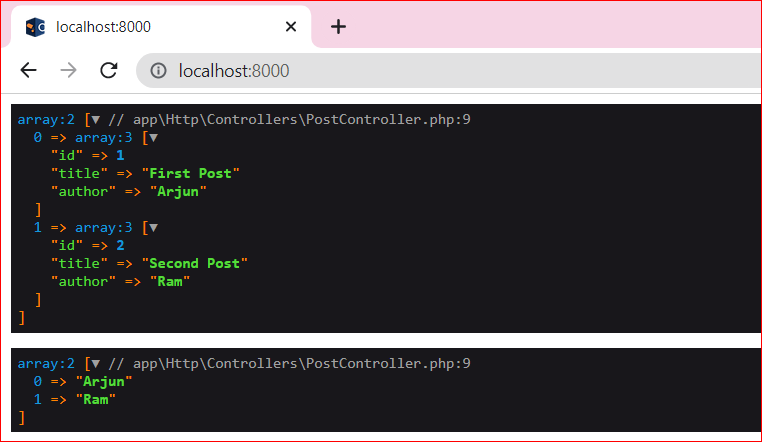
Now go to your controller and write code for testing this service.
<?phpnamespace App\Http\Controllers;use Illuminate\Http\Request;use App\Services\PostServices;class PostController extends Controller{public function index(PostServices $post){dd($post->posts(),$post->postAuthors());}}
Now start your app and test it on the browser
php artisan serve